Tax law moved. Your invoice template didn't. The CFO of your biggest client has flagged three invoices from last quarter that don't carry the right reverse-charge note, and you're looking at your invoicing tool wondering when it last updated.
This is the everyday surface of GST and Regional Tax Invoicing Software: the part where the math is correct, the format is right, and the document holds up when someone asks questions a year later.
This guide is a practical look at what serious GST and Regional Tax Invoicing Software needs to do across multiple jurisdictions — from India's GST to UK and UAE VAT to US state-by-state sales tax — and the surprisingly mundane reasons most cloud tools fall short of it.
Why This Category Exists
Generic invoicing apps treat tax as an afterthought: a percentage field on a line item, a single number at the bottom, maybe a country selector if you're lucky. That works when you're selling to one country at one rate.
Real GST and Regional Tax Invoicing Software exists because the moment you cross regimes — or even cross states within India — that single-percentage model breaks:
- An intra-state Indian GST invoice needs CGST + SGST split — not one combined number.
- A UAE VAT invoice needs the supplier's TRN, the customer's TRN (for B2B), and the line-level VAT breakdown.
- A UK VAT invoice may need a reverse-charge note for B2B services and the supplier's UK VAT number on the document.
- A US sales-tax invoice depends on the destination state, with rates that change quarterly.
Bolting these onto a generic invoice generator usually means custom fields, manual notes, and a one-off PDF per regime. Real GST and Regional Tax Invoicing Software has the regime logic baked in, so the document comes out right because the data model knows which regime it's operating under.
What Good Looks Like
A short checklist for any tool calling itself GST and Regional Tax Invoicing Software:
Multiple tax regimes in one product
GST (with CGST/SGST/IGST/UTGST), VAT, and configurable percentage-based tax — not separate apps or paid add-ons.
A real offline tax calculation tool inside
The math runs locally. An offline tax calculation tool doesn't need a server round-trip to apply 9% + 9% to a line total. It just does it.
Templates the auditor recognises
Required fields show up automatically based on the regime — GSTIN, TRN, place of supply, reverse-charge notes — without you remembering each one.
Long-term record retention
Three-year minimum in most jurisdictions, longer in some. The records have to still be readable when someone asks for them in 2029.
Honest scope
Generate the documents and the math correctly. Don't pretend to also be a return- filing portal or an e-invoicing IRP integration unless you actually are.
A Multi-jurisdiction invoice generator that hits those five is rare. Most cloud tools hit one or two and call themselves “international.”
Multi-Jurisdiction Reality
Here's what a real Multi-jurisdiction invoice generator needs to keep straight, by region:
| Region | Regime | Identifier | Document Quirk |
|---|---|---|---|
| India | GST (CGST/SGST/IGST) | GSTIN, HSN/SAC | Place of supply drives split |
| UAE | VAT (5%) | TRN | Customer TRN on B2B |
| UK | VAT (20% standard) | UK VAT number | Reverse-charge note where applicable |
| USA | State sales tax | State permit / EIN | Destination-based, rate by ZIP |
| EU export | Zero-rated VAT | VAT IDs both sides | Note: reverse-charge VAT applies |
VoxInvoice handles this via business profiles. Each business carries its own regime, identifier, default currency, and invoice template. A solid Multi-jurisdiction invoice generator doesn't ask you to remember to toggle “VAT mode” before issuing a UK invoice — the profile knows.
Practical sequence in the app: switch business profile → client country auto-suggests place of supply / VAT logic → line items pick up the right tax label → PDF renders with the regime-appropriate header fields.
That's the operational test of any Multi-jurisdiction invoice generator: can it produce a correct UK-VAT invoice and a correct same-state CGST/SGST invoice without you renaming columns or editing the template each time?
Getting the Math Right
Manual tax math is where small businesses bleed time and trust. Spreadsheet formulas drift. Rates change. Someone copies last quarter's template and forgets to update the IGST rate when the rule changed. A proper offline tax calculation tool takes that whole class of error off the table — which is the operational definition of automated regional tax compliance at the document level.
VoxInvoice's offline tax calculation tool sits inside the invoice editor. Set the tax rate on a line item (or accept the default for the business), and the engine applies the regime's split rules:
- 18% GST same-state → CGST 9% + SGST 9%, two separate line totals
- 18% GST inter-state → IGST 18%, one line total
- 5% UAE VAT → single VAT line, AED format
- Custom 7.25% US sales tax → single line, USD format
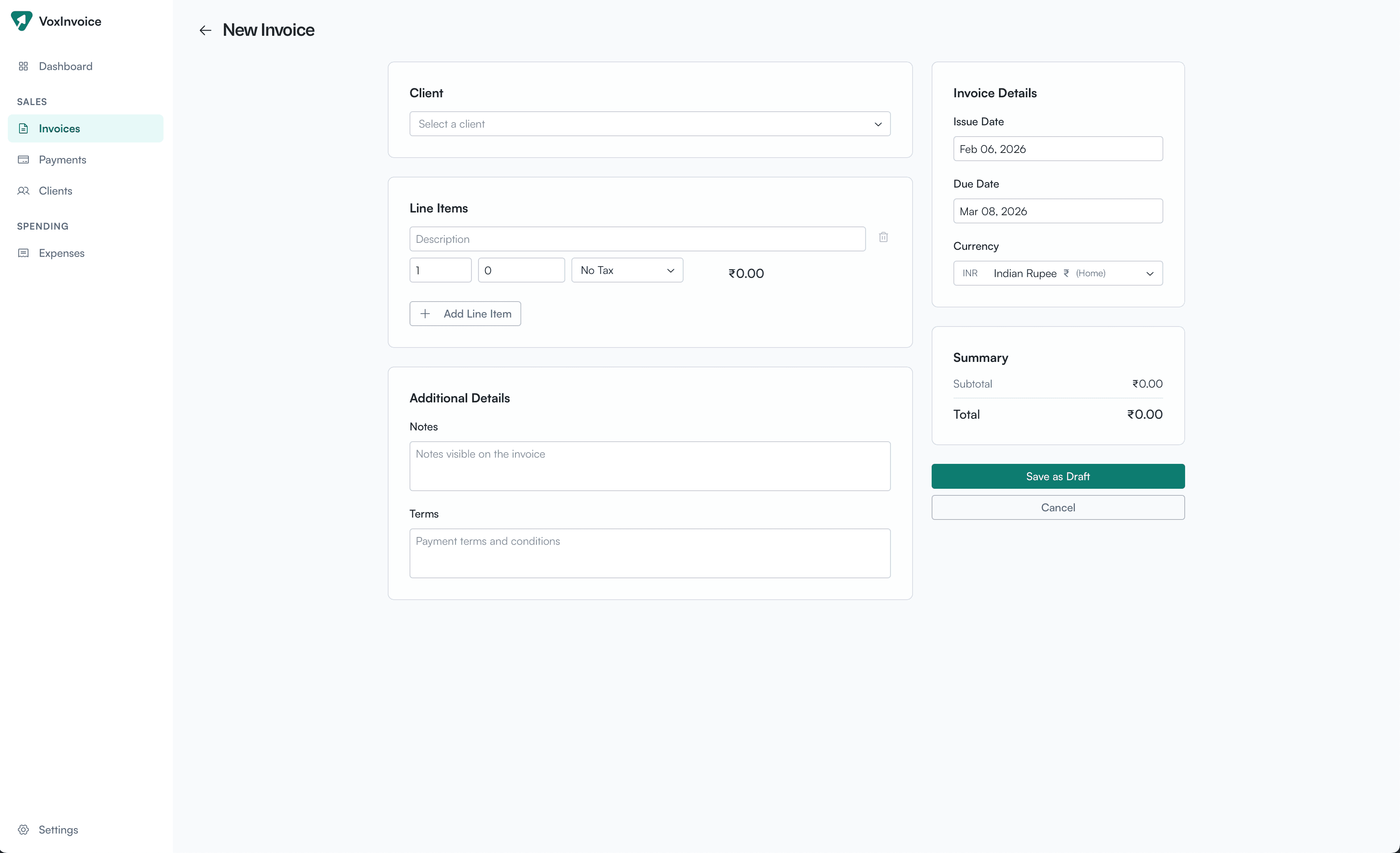
Line-level tax with regime-aware splits, totals balanced to the cent (or paisa).
Because the offline tax calculation tool runs locally, it also runs when the WiFi doesn't. Generating an invoice from a client's office, an airport, anywhere — the math is the same.
The point of running it as an offline tax calculation tool isn't speed — invoicing isn't latency-sensitive. The point is that nothing about your ability to produce a legally formatted invoice depends on a third party's uptime.
Templates That Pass Audit
Templates are where the “invoice software” category usually goes thin. Generic tools give you a logo upload, a colour picker, and the same hardcoded field list across regimes.
Real custom GST billing templates need to do regime-aware variation:
- Show GSTIN, place of supply, and HSN/SAC for Indian invoices
- Show TRN and VAT-inclusive line totals for UAE invoices
- Show reverse-charge note for applicable UK B2B services
- Show signature line, payment terms, and bank details consistently
- Stay the same across the same regime, so your CA recognises the pattern at filing time
VoxInvoice provides custom GST billing templates that adapt to the business profile's regime automatically. You set your business identifier, payment details, and invoice number format once, and the document renders correctly each time you bill a client under that regime.
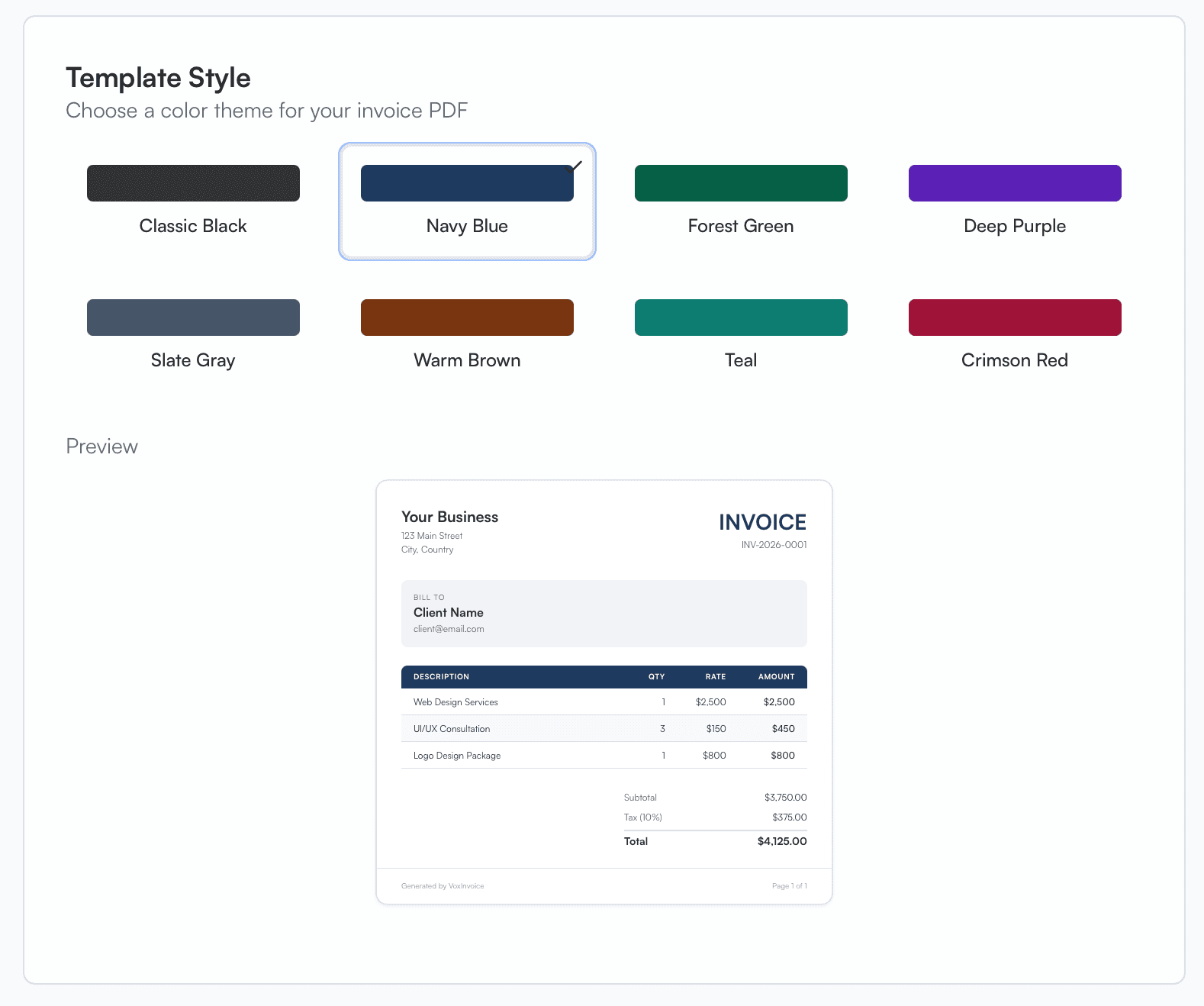
Template style configured per business — branding, layout, and regime-aware fields.
Good custom GST billing templates are also boring on purpose. A wild layout makes invoices harder for accountants to scan, which is the opposite of what you want at quarter end.
And because custom GST billing templates in VoxInvoice are part of the business profile, switching between your Indian agency books and your UAE LLC produces two clearly distinct, regime-correct invoices without re-configuring anything.
That predictability is the actual deliverable of custom GST billing templates: not visual flair, but consistency across hundreds of documents and across years of records.
Record-Keeping for the Long Term
Tax authorities don't ask for invoices right after you send them. They ask 18 months, 24 months, sometimes 5 years later, and they want the original document in the form it was sent.
Secure local tax record management is the unglamorous backbone of any serious GST and Regional Tax Invoicing Software. It looks like:
- Every issued invoice retained in a local SQLite database, immutable once paid/finalized
- PDFs reproducible from the data model — same numbers, same template, byte-for-byte close to the original
- Full JSON backup that lets you move years of records to a new machine in one file
- No vendor dependency — if you stop using the app, you still have the records on disk
Strong secure local tax record management matters more than uptime. A cloud invoicing tool with 99.9% uptime is still hostile if its export format mangles your historical invoices, or if your subscription lapses and the older records go behind a paywall.
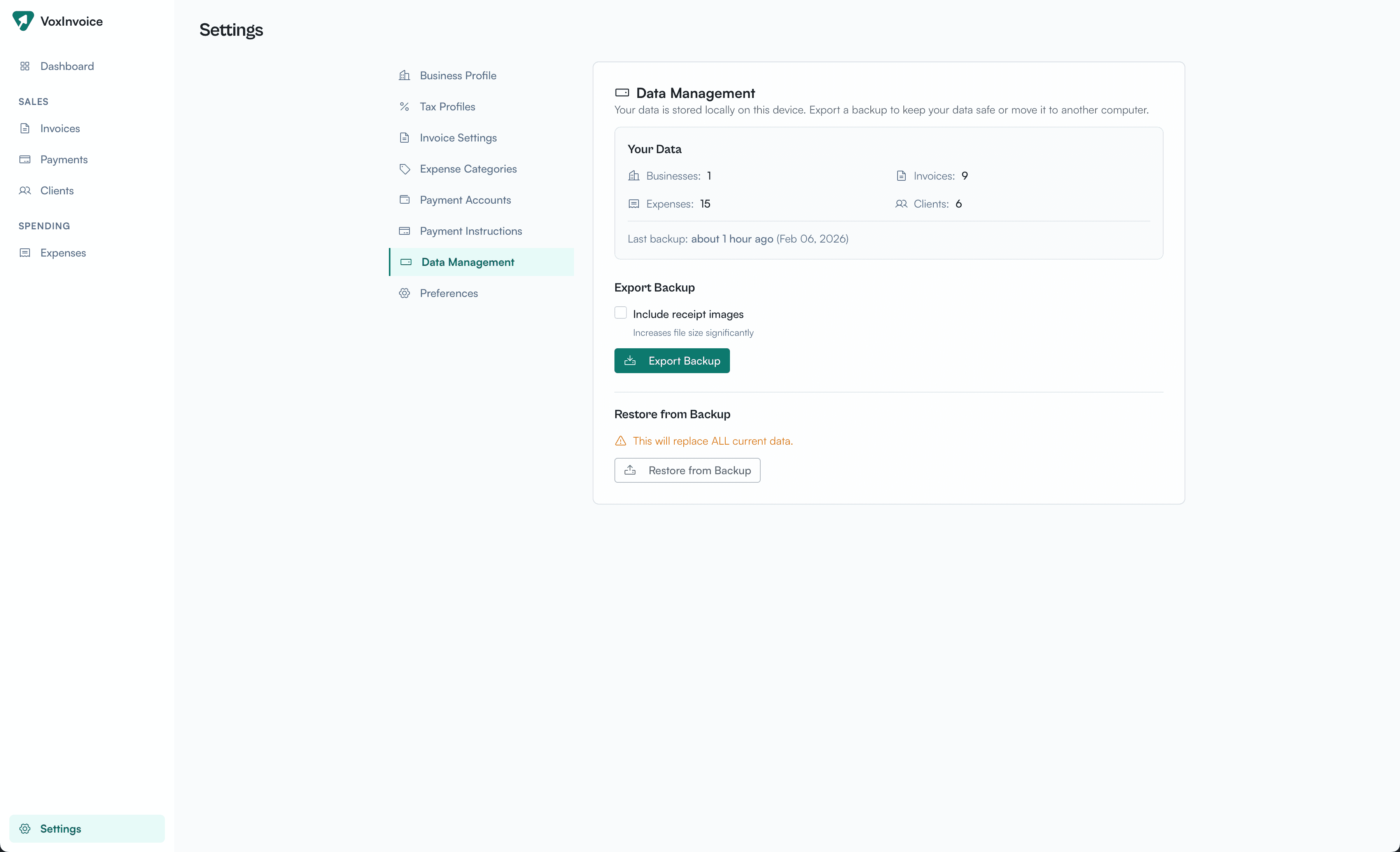
Backup → JSON file → restore on another machine. That's the whole pipeline.
With proper secure local tax record management, your archive lives in a format you control: a single SQLite file you can copy, an encrypted disk you choose, a backup folder synced to your own storage. Automated regional tax compliance only matters if the resulting records survive the years it takes for someone to ask about them.
Pair secure local tax record management with regular JSON exports to an encrypted external drive and you have the audit posture most small businesses actively want but rarely set up.
Worth a note: secure local tax record management isn't the same as cloud backup. It's a deliberate choice to keep the originals where you control them, and to make their portability your responsibility.
Why Offline, Specifically
Cloud invoicing tools have one advantage: convenience. They have a long list of disadvantages for tax work specifically:
- Their uptime decides whether you can issue a corrected invoice on filing day.
- Their data export is rarely as usable as it should be — formats change, fields get renamed.
- Their subscription lapse can lock historical invoices behind a paywall.
- Their breach is your breach — your client GSTINs, your revenue numbers, your payment timing.
Running GST and Regional Tax Invoicing Software offline doesn't fix every problem — you still own backups, you still need to update for new rates — but it removes the entire class of failure where a vendor's incident becomes your incident.
Automated regional tax compliance is most useful when it's reliable. Offline is more reliable than cloud for the specific job of generating correctly-formatted invoices.
What This Software Isn't
Honest scope for any GST and Regional Tax Invoicing Software (including VoxInvoice):
- Not a return-filing portal. It produces clean numbers; the GSTN/HMRC/FTA portal files them.
- Not an IRP/e-invoicing integration. Above-threshold Indian businesses still file e-invoices separately.
- Not a full accounting system. No double-entry ledger, no balance sheet, no bank reconciliation.
- Not a CRM. Clients are a list with addresses and tax IDs, not a sales pipeline.
For most small businesses below the e-invoicing threshold, automated regional tax compliance at the document level plus an accountant who handles filings is the entire stack you need. The job of GST and Regional Tax Invoicing Software ends where the GSTN portal begins.
Common Questions
How does the offline tax calculation tool stay current with rate changes?
Rates are configurable per line item and per business default — you set them once. When India changes a GST slab or the UAE updates VAT, you change the default. A pure offline tax calculation tool doesn't auto-pull rate tables, because your accountant should review changes anyway.
Does automated regional tax compliance work for US sales tax?
You can set a custom percentage and tax label per business or per line item. Full destination-based US sales tax (rate by ZIP, marketplace facilitator rules) is a deeper integration than VoxInvoice provides today. Automated regional tax compliance at the percentage-and-document level works; nexus calculation does not.
Can I customise the invoice layout for different clients?
Custom GST billing templates are configured per business, not per client. Within one business profile, every client gets the same regime-correct layout with their specific details filled in. That's deliberate — consistency makes audit simpler.
How do I keep secure local tax record management running long-term?
Two layers: VoxInvoice's built-in JSON export (Settings → Data Management), plus your OS-level backup (Time Machine, File History, restic). One inside-the-app backup, one outside-the-app backup. That's the practical floor for secure local tax record management.
Does the multi-jurisdiction invoice generator handle EU intra-community supplies?
Yes — set the business to a VAT regime, set the VAT line to zero-rated for the relevant client, add the reverse-charge note in the invoice notes field. A general-purpose Multi-jurisdiction invoice generator handles this via configuration, not a hardcoded EU module.
Is this all really free?
The desktop app is free forever — full GST, VAT, multi-currency, two business profiles, unlimited invoices. VoxInvoice Plus (coming) will add cloud sync, team seats, and a third business slot. The offline tax features that make this a real GST and Regional Tax Invoicing Software are in the free tier.
Get VoxInvoice
VoxInvoice is free GST and Regional Tax Invoicing Software for macOS, Windows, and Linux. GST, VAT, configurable regional tax, multi-currency, two business profiles. No account. No subscription.
Tax-correct invoices, on your machine.
Free forever. GST, VAT, multi-currency — calculated locally, stored locally.
Download VoxInvoice — FreeQuestions about a specific tax situation? Reach us at hello@voxinvoice.com.